

Member
Account & Identity Verification
Verification confirms who you are and unlocks more features. Open Verification in your Dashboard — there are four independent cards.
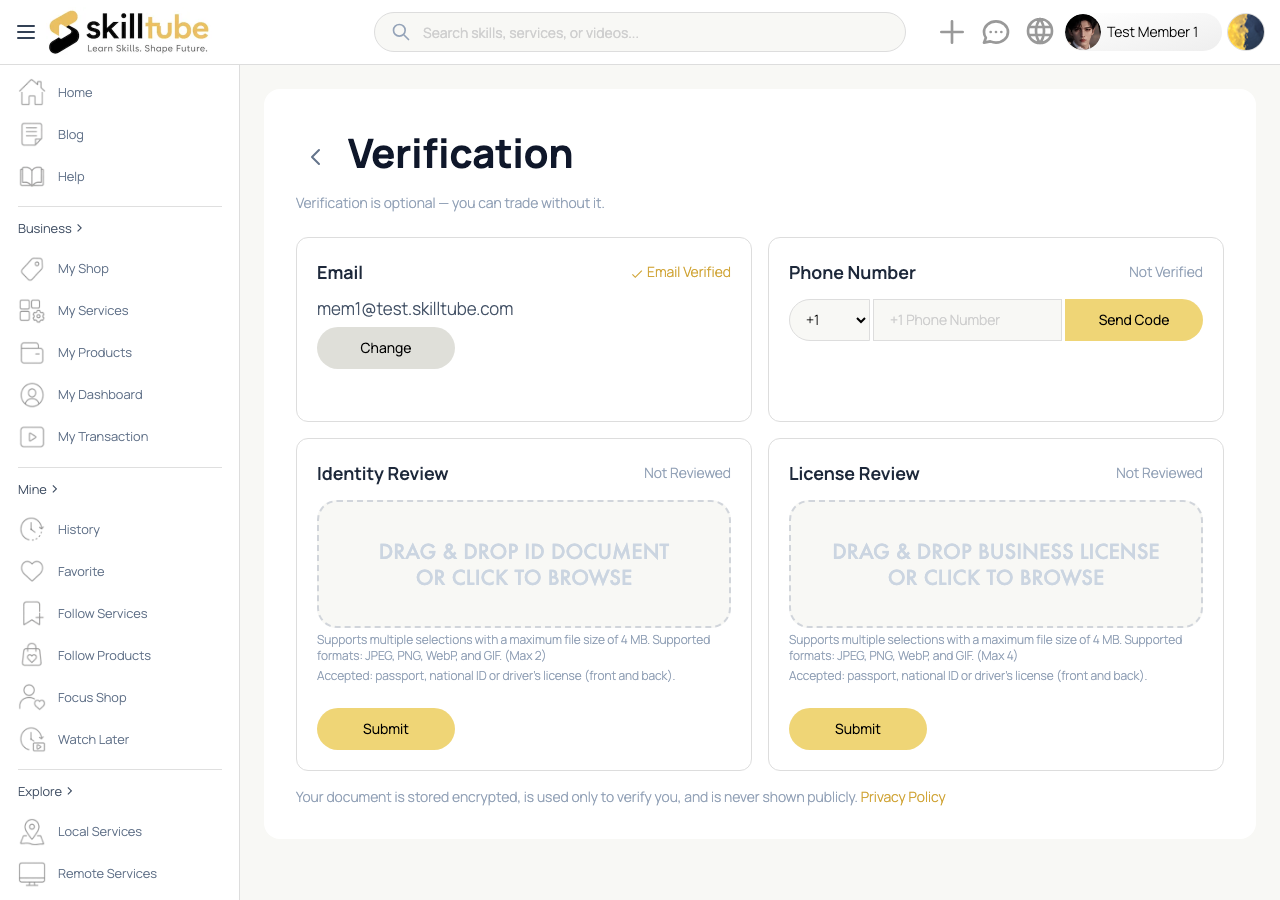
Email Verification
- Check your inbox for the verification email after signing up.
- Click the link to verify. An unverified email limits some features.
- To use a new email address, choose Change on the Email card and confirm the verification email we send to the new address.
Phone Verification
- On the Phone Number card, pick your country code, enter your number and choose Save.
- Enter the 6-digit code you receive by SMS and choose Verify.
Identity (ID) Verification
Some features, such as age-restricted purchases and merchant verification, require identity confirmation:
- Open the Identity Verification card.
- Upload up to 2 images of your identity document — up to 4 MB each, in JPEG, PNG, WebP or GIF format.
- Submit — your document is checked automatically and the result is shown right away.
Business Verification
For shops and business accounts:
- Save your shop first — business verification needs an existing shop.
- Open the Business Verification card and upload up to 4 images of your business documents — up to 4 MB each, in JPEG, PNG, WebP or GIF format.
- Submit — the result is shown right away.
You can re-verify on any card at any time, even after it is verified.
🔍 Tip: Your documents are stored securely and used only for verification.
Need help with this page?
Open the Report page to file a report or a support ticket — appeals are handled through the same form.